
More results...
More results...
More results...

How to access, save and sign assessment forms in the Dental Workflow.
Updated 6 months ago.
How to quickly prescribe from a preset list of common Dental medications.
Updated 2 months ago.
How to use public auto text phrases in Dental
Updated 2 months ago.
How to document home medications using the Workflow component.
Updated 2 months ago.
How to accept a proposed order placed by a student.
Updated 6 months ago.

How to add problems in the Dental Hospital.
Updated 2 months ago.
A guide for dental students when placing orders to ensure the correct authoriser is selected.
Updated 6 months ago.
How to order an X-ray in Dental.
Updated 2 months ago.
How to set up the Dental tabs in the Workflow.
Updated 9 months ago.
How to sign dental student documentation of medication history.
Updated 9 months ago.

How to configure Powerchart and set your preferences for Inpatients and Outpatients
Updated 1 day ago.

How to select a clinic from Ambulatory Organiser
Updated 4 weeks ago.

How to create a note from the default note links on the workflow
Updated 1 month ago.
How to set the clinic date in Ambulatory Organiser
Updated 4 weeks ago.
How to create a note from the 'Select Other Note' option at the bottom of…
Updated 1 month ago.
How to view patient demographics in Ambulatory Organiser
Updated 4 weeks ago.
How to update the patient status in Ambulatory Organiser
Updated 4 weeks ago.
How to revise a note that has previously been signed in Powerchart.
Updated 4 weeks ago.
How to record an admin note in Ambulatory Organiser
Updated 4 weeks ago.
How to add an addendum to a note that has previously been signed in Powerchart
Updated 4 weeks ago.
How to open the correct encounter from within Ambulatory Organiser
Updated 4 weeks ago.
Notes created by students
Updated 4 weeks ago.

Add orders to your favourites with the details populated.
Updated 4 weeks ago.
How to document the administration of medications in the Patient Record
Updated 4 months ago.
How to view and document Allergies in the electronic patient record
Updated 4 weeks ago.
How to use the Ambulatory Organiser screen to manage clinic lists
Updated 4 weeks ago.

How to set up, navigate and enter data in the Assessments & Fluid Balance screen
Updated 1 month ago.
How to manage, create, copy and insert auto text.
Updated 4 weeks ago.
How to use the auto text copy function to share auto-text templates between users in…
Updated 4 weeks ago.
How to insert auto text when creating a note
Updated 1 month ago.
How to create new auto text templates for use in clinical documentation.
Updated 1 month ago.
How to change the timescale interval for data entry columns in Assessments.
Updated 4 weeks ago.
How to enter data and complete assessments in Assessments/ Fluid Balance
Updated 1 month ago.
How to sign a note created by a student in Message Centre
Updated 6 months ago.
How to create a note using the +Add button in Document Viewing
Updated 1 month ago.

FAQ for Dental Hospital Digitalisation
Updated 5 months ago.
How to document and manage allergy information in the patient record
Updated 1 month ago.
How to find a specific document on the patient record by Author, Contributor, Date or…
Updated 1 month ago.
How to insert a column for a specific date and time in Assessments.
Updated 1 month ago.
How to navigate the assessments/fluid balance screen using the keyboard
Updated 1 month ago.

How to document the insertion, ongoing care and removal of Lines, Tubes, Drains and Devices…
Updated 4 months ago.
This allows you to add new auto text phrases or edit existing ones.
Updated 4 weeks ago.
How to Modify or Unrecord (mark in error) previously entered assessments in the Assessments/ Fluid…
Updated 4 weeks ago.
Overview of the 'Note Type List Filter' drop down field.
Updated 1 day ago.
How to make a note. Including add and modify, note types, autotext, tagging.
Updated 1 month ago.
How to Order from within the Workflow.
Updated 4 weeks ago.
Ordering from the Workflow You are placing an order for a patient from a Workflow…
Updated 4 weeks ago.
How navigate the Orders section, including filters, details and order status.
Updated 4 weeks ago.
Manage your favourites and organise them into folders.
Updated 4 weeks ago.
How to review, accept or reject proposed orders for Parenteral Nutrition Prescriptions
Updated 4 weeks ago.
How to generate Parenteral Nutrition order proposals for sign off by medical staff
Updated 4 weeks ago.
How to set up a personal note type list
Updated 1 day ago.
How to prescribe medications for inpatients and outpatients
Updated 10 months ago.

How to print QR code labels for scanning of paper documents in Document Store.
Updated 6 months ago.

Overview of the Results screen
Updated 4 weeks ago.
How to use the search facility in Assessments/Fluid Balance to find data.
Updated 4 weeks ago.
How to change which screen you view first when opening a patient record
Updated 4 weeks ago.
Look up and use or save a colleagues order favourites.
Updated 4 weeks ago.
This guide explains how to tag results/text and how to apply a tag to a…
Updated 4 weeks ago.
Use Tear Off to have two different views of a patient's record, simultaneously.
Updated 4 weeks ago.
Using favourites when ordering via Requests/Care Plans or Drug List.
Updated 4 weeks ago.
Using favourites when ordering via New Order Entry or New Requests in Workflows.
Updated 4 weeks ago.
How to view previously documented allergy information in the patient record
Updated 4 weeks ago.
How to view tracked changes and the document history of an existing note in Powerchart
Updated 4 weeks ago.
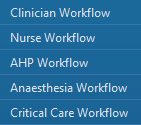
How to set your preferences for any Workflow screen
Updated 4 weeks ago.