Did Not Attend (DNA)
Scenario
At the end of the clinic, any patients who have not arrived should be marked as Did Not Attend. Before doing so, confirm with clinical staff that the patient did not attend their appointment.
Instruction
- Open Schapptbook.
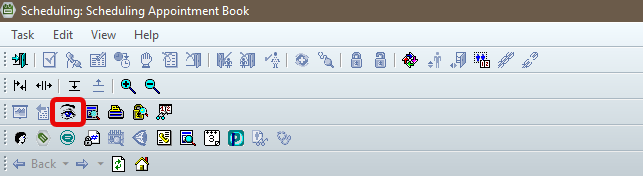
- Click Schedule Enquiry (eye icon).
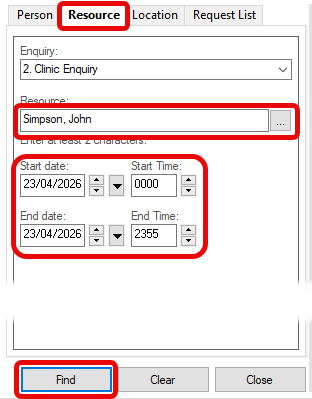
- Click Resources tab.
- Enter the clinic name, and click the ellipsis (…).
- The list will default to today. If require other dates, select the correct Start date and End date.
- Click Find.
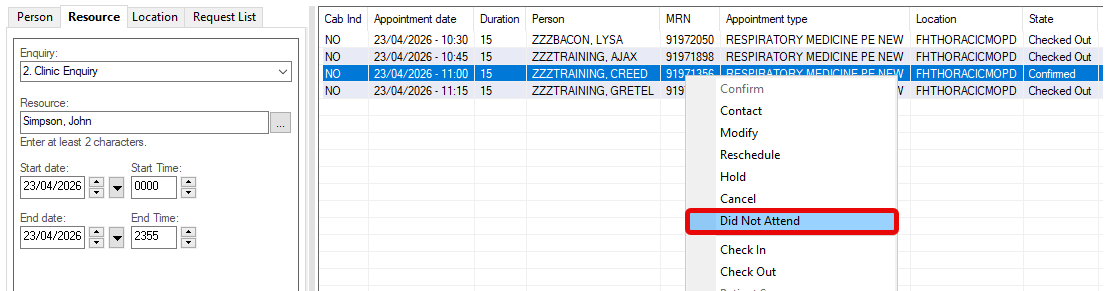
- Right click the correct patient and select Did Not Attend.
You can only set a patient to “Did Not Attend” if their current state is Confirmed.
Ensure confirmation has been obtained from clinical staff that the patient did not attend the appointment before updating the status to Did Not Attend.
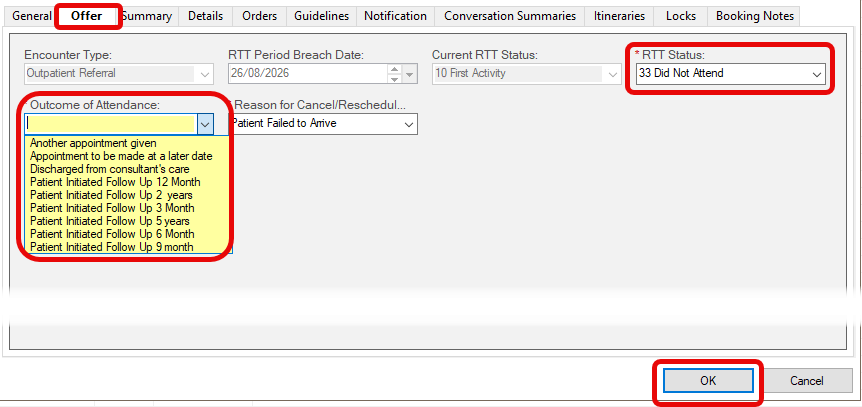
- In the No Show window, open the Offer tab.
- Set RTT Status to Did Not Attend.
- Choose appropriate option under Outcome of Attendance.
- Click Ok.