
More results...
More results...
How to use your order favourites when ordering via Requests / Care Plans or Drug List within PowerChart.
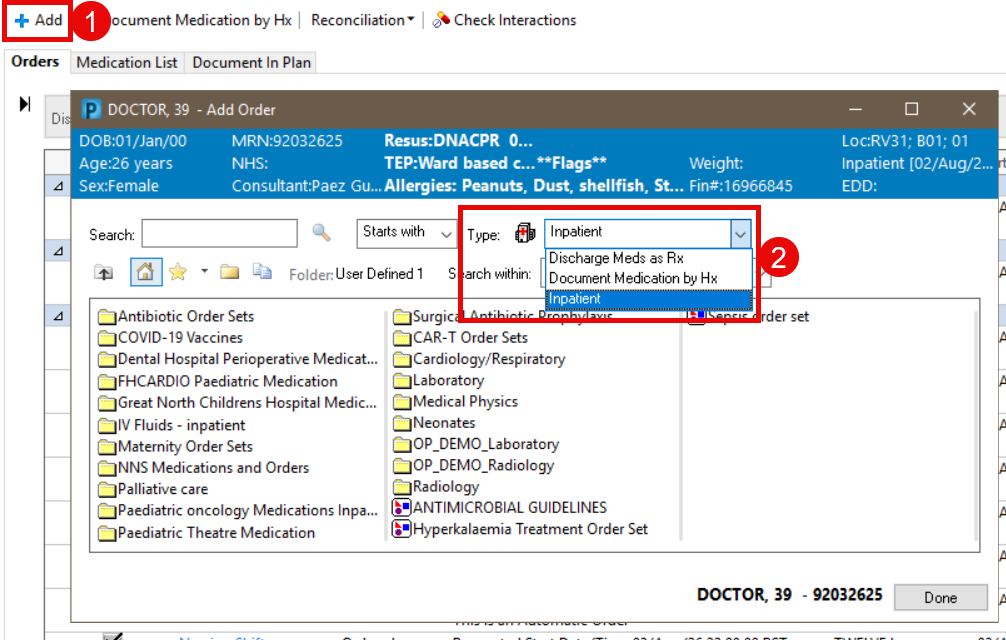
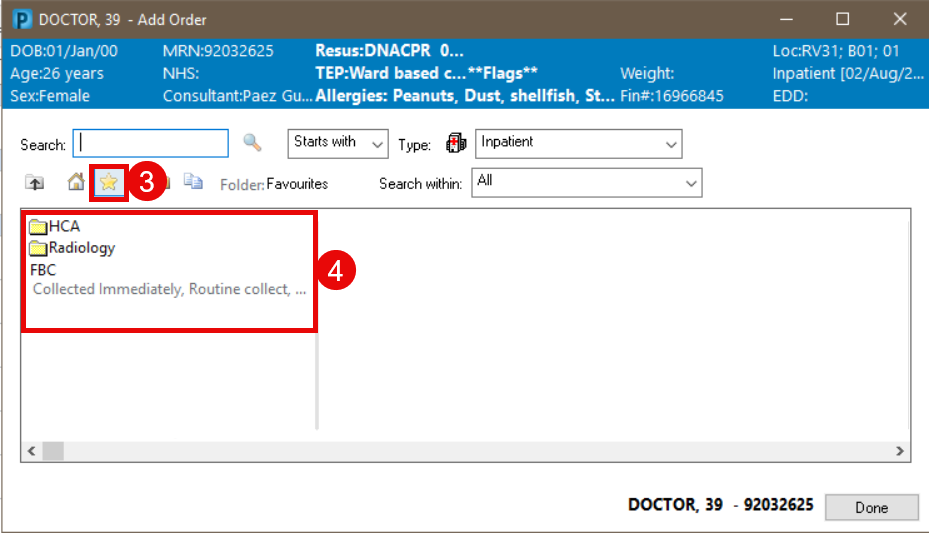
The favourites that display when clicking the star relate to the Type used when saving them. The table below shows which type to select to view/use a favourite.
| The favourite I saved was a… | Venue/Type when saving was… | Venue/Type to use this favourite is… |
| Medication | Inpatient | Inpatient |
| Discharge Meds as Rx | Discharge Meds as RX or Outpatient Prescribing |
|
| Given in Clinic | Given in Clinic or Outpatient Prescribing > Ambulatory in-office favourites |
|
| Outpatient Prescribing | Discharge Meds as RX or Outpatient Prescribing |
|
| All other order types (radiology, bloods, labs etc.) | Inpatient | Inpatient |
| Given in Clinic | Given in Clinic or Outpatient Prescribing > Ambulatory in-office favourites |
|
| Outpatient Prescribing | Given in Clinic or Outpatient Prescribing > Ambulatory in-office favourites |