Depart a Patient from SystmOne (UTC Specific)
Scenario
When a patient arrives as a walk-in at an Urgent Treatment Centre, an attendance record must be created and when concluded the patient must be departed. Before the departure screen can open the chief complaint and clinical coding must be recorded.
Instructions
- From the toolbar select the A&E overview

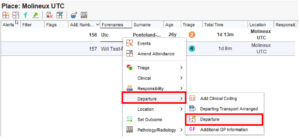
- From this screen right click on the patient then hover over Departure then click Departure
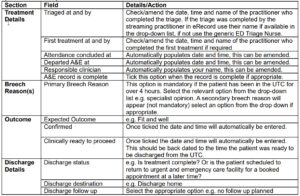
- Complete the Departure details by completing the relevant fields and selecting the appropriate
options from the drop-down menus
Note: All sections marked with an asterisk are are mandatory and must be completed
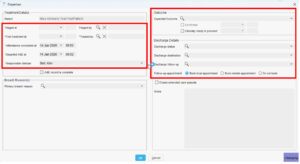
- Select Ok to complete the Departure.
This process ensures that attendances are accurately recorded for patient care and national reporting
requirements (ECDS).Departure Guidance