Perioperative Tracking
Introduction
Perioperative Tracking displays patient lists by area eliminating the need to search for individual patients.
- The list shows patients booked for current day only (from midnight to midnight).
- Opening patient records using Perioperative Tracking helps to ensure you are documenting on the correct patient and the correct encounter.
Navigating to Perioperative Tracking
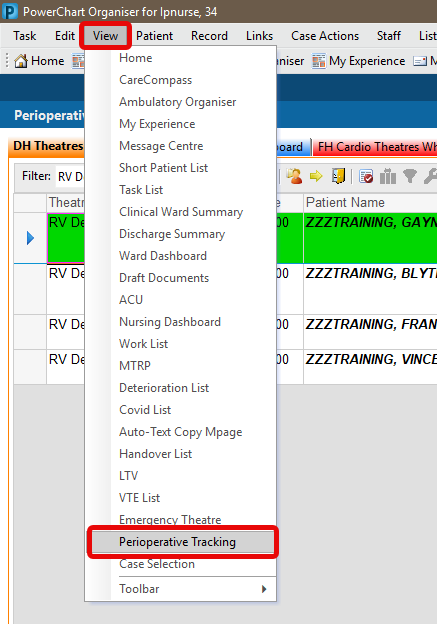
Method 1:
Click
View in the grey menu bar at the top of the screen.
From the drop down list that appears, select Perioperative Tracking.
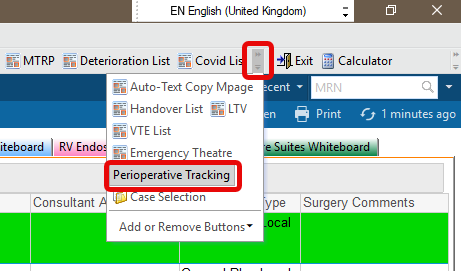
Method 2:
Click on
Perioperative Tracking in the grey menu bar at the top of screen.
If unable to see, click the small icon indicated in the image below to reveal options including Perioperative Tracking.
Whiteboard selection and filtering
- Click a tab to choose a Whiteboard. It will show all patients scheduled today across all theatres in that area.
- Apply a theatre filter by clicking the downward-facing arrow icon and selecting the appropriate option.

Perioperative Tracking layout

- Theatre: As per booking
- Start Date and Time: As per booking
- Patient Name: Clicking the name opens the patient’s record for the relevant encounter.
Other ways to open patient record:
- click on the blue arrow
 at the left end of the row
- or select the patient row, click Record in the top grey menu, and pick the section of the record to open.
- Gender/Age
- MRN
- Status: Information is pulled from Perioperative Documentation and visually represents the patient’s current position in the operative journey through text and colour coding.
- Event Time: Represents the documented start time of the current status
- Allergy: Each status has a clickable icon that allows you to review existing documentation or add new information.
- Allergies Not Documented

- No Known Allergies

- No Known Medication Allergies

- Allergies are recorded

- Procedure: Information pulls from the Schapptbook booking and the Perioperative Documentation
- Procedure Comments: Information pulls from the Schapptbook booking and the Perioperative Documentation
- Ward: This indicates the patient’s originating ward. On the ward bedboard, Theatre is depicted by a scalpel icon and Recovery by a sutured wound icon.
- Operating Surgeon: Information pulls through from the Perioperative Documentation
- ConsultantAnaesthetist: Information pulls through from the Perioperative Documentation
- Anaesthesia Type: Information pulls from the Schapptbook booking and the Perioperative Documentation
- Surgery Comments: Click in the field to type free text.
Updated: 31 January 2026
