Requesting an Emergency Procedure
How to request an emergency theatre procedure in Powerchart.
- Open the patient record of the patient that requires an emergency procedure.
- Select Requests/ Care Plans from the menu on the left.

- Click the +Add button to the top left of the screen.

- In the search window, search for ’emergency theatre’.
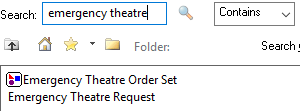
- Select ‘Emergency Theatre Request’.
- In the form that opens, complete the mandatory (yellow) fields as appropriate.
- Sign the form using the green tick at the top left
 .
.
- In the orders screen, Sign the order using the button at the bottom right
 .
.
- Refresh the screen.
Updated: 10 February 2026
