The insertion of a line, tube, drain or device has already been documented and now you want to document on going care or assessment.
Instructions
In the Assessments/ Fluid Balance screen, locate the Line, Tube, Drain or Device you wish to document
You do not need to add a tick at the top of the column when starting an assessment
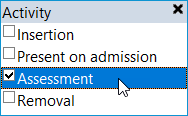
In the Activity field for the Line, Tube or Device, double-click and select Assessment or Ongoing Care (this will vary depending on the type of Line, Tube, Drain or Device being documented):
You can either insert a column at a specific time or use the appropriate blank column for the time period you are documenting
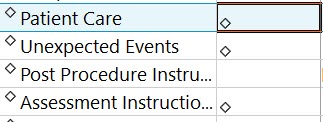
The fields that are part of the assessment are marked with a diamond icon:
Your cursor will automatically move to the first field that you need to complete to document the Assessment.
Document the the relevant information about the assessment.