Quick Guide
How to document the removal of a Line, Tube, Drain or Device
- In the line of the line/tube/device of interest, double click in the Activity field.
You do not need to add a tick at the top of the column when starting the removal
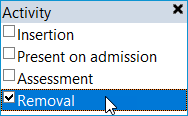
- Select Removal:
- Fields relevant to Removal will contain a diamond shape. The cursor will be on the first relevant field. Address fields as appropriate:

- Sign the data, making it a permanent part of the patient record, by clicking on the green tick:

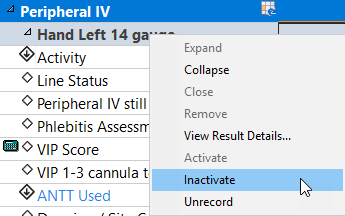
- Right click on the name of the line/tube/device and select Inactivate. This will grey out and collapse the section here in Assessments/Fluid Balance and indicate elsewhere in the Patient Record that it has been discontinued: