Setting Preferences for Drug List View
Scenario
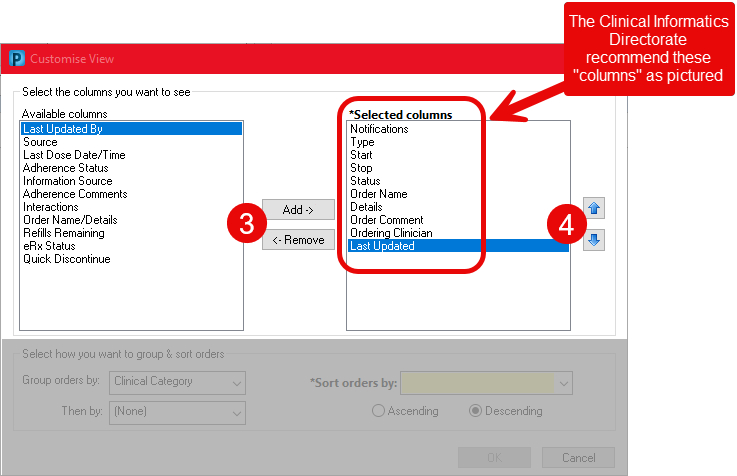
In line with the Clinical Informatics Directorate recommendations, you MUST set your Drug List (Medication List) view as described below. Once completed it will remain this way each time you open a patient record in PowerChart.
Instructions
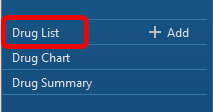
- With a patient record open, select Drug List from left side menu.
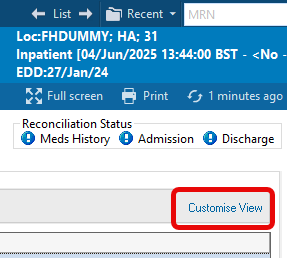
- Select Customise View from the right side of the patient record.
- In the Select the columns you would like to see section use the Add and Remove buttons to set the Selected Columns to the following:
- Notifications
- Type
- Start
- Stop
- Status
- Order Name
- Details
- Order Comment
- Ordering Clinician
- Last Updated By
- Use the up and down arrows to put the list into the order shown.
- In the Select how you would like to group and sort orders section set the following:
- Group Orders By: Active/Inactive.
- Then By: Clinical Category.
- Sort Orders By: Order Name.
- Ascending order.
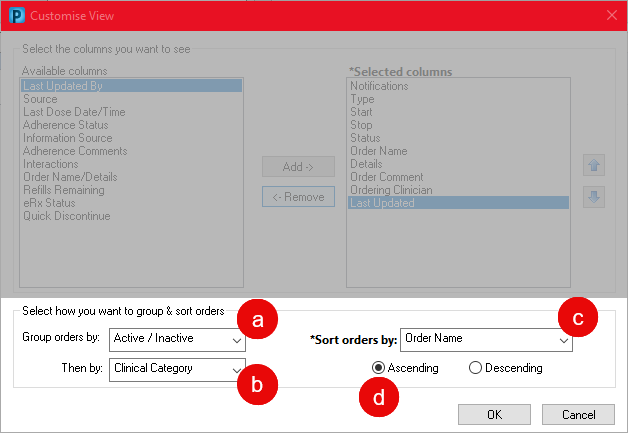
- Click on OK.
