How to create Duty of Candour in Document Creation:
Instructions
Open the patient’s notes in Powerchart:
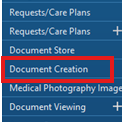
Navigate to Document Creation in Table of Content.
Choose correct encounter associated with incident, Department and the letter type “Duty of Candour Patient Safety Incident PSIRF” or “Duty of Candour Patient Safety Incident PSIRF Priority”.
Choose who to send to: Patient or Other.
The template letter will load.
Remove GP from top left of banner bar:
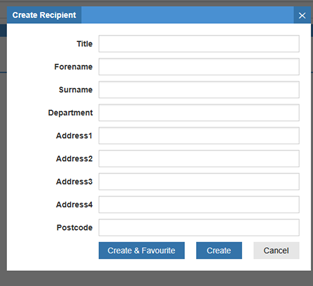
If recipient is next of kin or other family member, you will need to add a custom recipient by clicking on ‘Add recipient’ and then “Create New Recipient” at bottom right of page. Add details in Create recipient box:
Add details in Create recipient box and click Create:
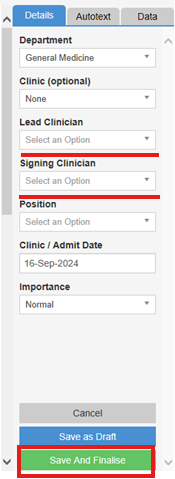
Insert your name into the Lead and Signing Clinician to right hand column options which will populate the letter.
You may not have permission for Signing Clinician, if not, raise an INC to request this
Replace the red writing with appropriate content in the template and delete all red writing at the end.
Click Save and Finalise when complete:
How to create Duty of Candour in Clinical Notes:
Instructions
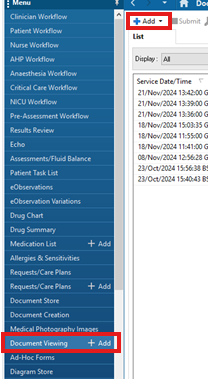
Go to Document Viewing and click on “Add”:
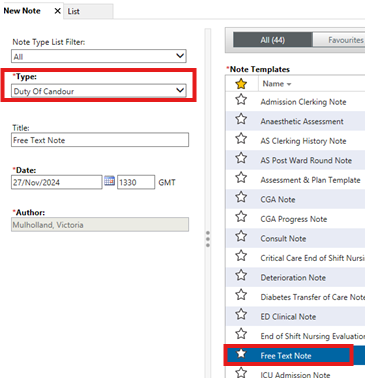
Select ‘Duty of Candour’ for the “Type” of Clinical Note and select ‘Free text Note’ in “Note Templates”. Click OK:
Document as required. It is recommended to complete the following:
1. Who was spoken to (patient, family including names)
2. Confirmation apology was provided
3. Facts of incident given
4. Staff contact details given
5. Whether or not a written apology was required or declined
6. Date, time and method (phone or in person) of discussion.
Click Sign/Submit.
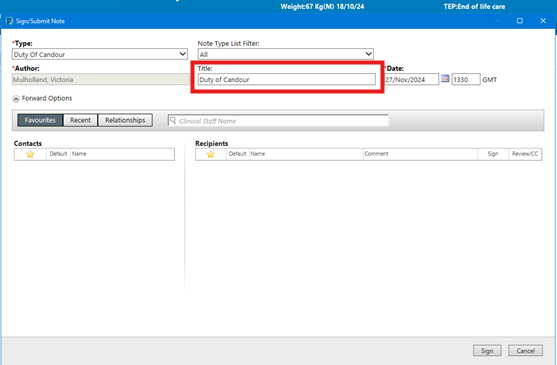
In pop up box, change Title to ‘Duty of Candour’. Click Sign: